


Early adopters wanted
En SCAN (縁SCAN): business process inventory for SMEs in Japan Make your company's work visible, measurable and easy to hand over.
En SCAN is a business process inventory tool that Enbito is building for small and mid-sized companies in Japan. It brings a work ledger, staff time surveys, and annual hours and labor-cost analysis into one place, so you can see what work your company does and how much time it takes.
En SCAN at a glance
- Status
- Early adopters wanted
- Best fit
- SMEs with roughly 20–50 employees
- How it is used
- Within Enbito's consulting support (AX Discovery, AX Transformation)
- Pricing
- Contact us
ProblemSound familiar?
Can you see all the work your company does?
- 01
No full picture
Work lives in people's heads, on paper and in scattered spreadsheets. No one can list everything the company does.
- 02
Hidden time costs
Nobody can say who spends how many hours a year on which task.
- 03
A handover is coming
A veteran is retiring, the business is changing hands, or two companies are merging, and the work has to move with them.
- 04
No clear place to start
You want to bring in AI or improve operations, but have nothing solid to decide where to begin.
En SCAN puts your work into a ledger and shows the annual hours and labor cost behind each task.
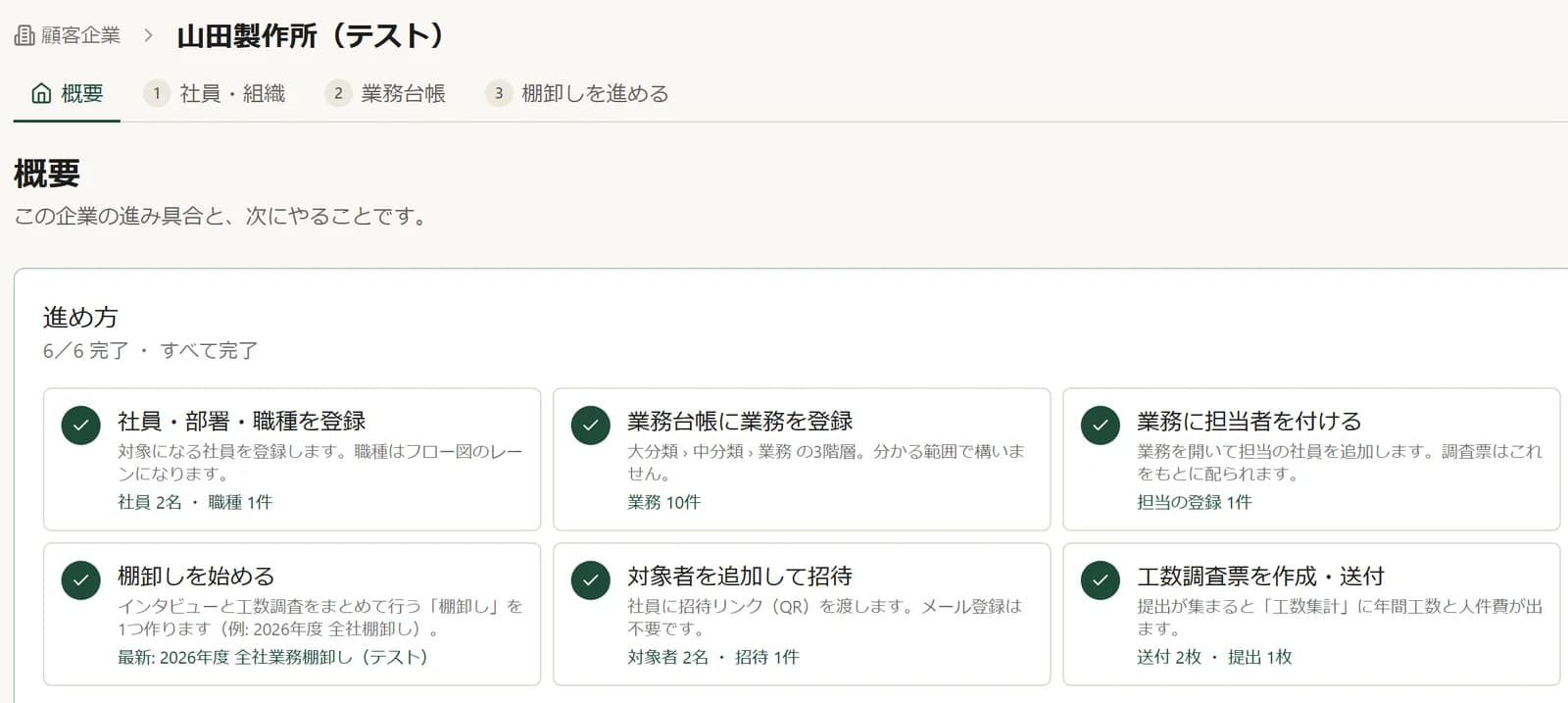
How it worksFour steps
A workflow audit in four steps.
STEP 01
Build the work ledger
Start from templates such as order intake, purchasing, manufacturing and accounting, and organize every task into three levels: category, sub-category and task.
STEP 02Staff
Invite your staff
Share an invitation link or QR code. Staff don't need to register an email address.
STEP 03Staff
Staff log their time
Each person fills in a time survey: how often they do each of their tasks, and how long it takes.
STEP 04
Read the analysis
Annual hours, labor-cost conversion, key-person dependency, rework and automation potential, summarized on one A4 page.
Output
What you end up with
- A three-level work ledger
- Annual hours and labor cost per task
- A one-page A4 diagnostic summary
In developmentAI interviews that talk with each employee to list their tasks and capture procedures.See the roadmap
FeaturesWorking today
From work ledger to labor-cost analysis.
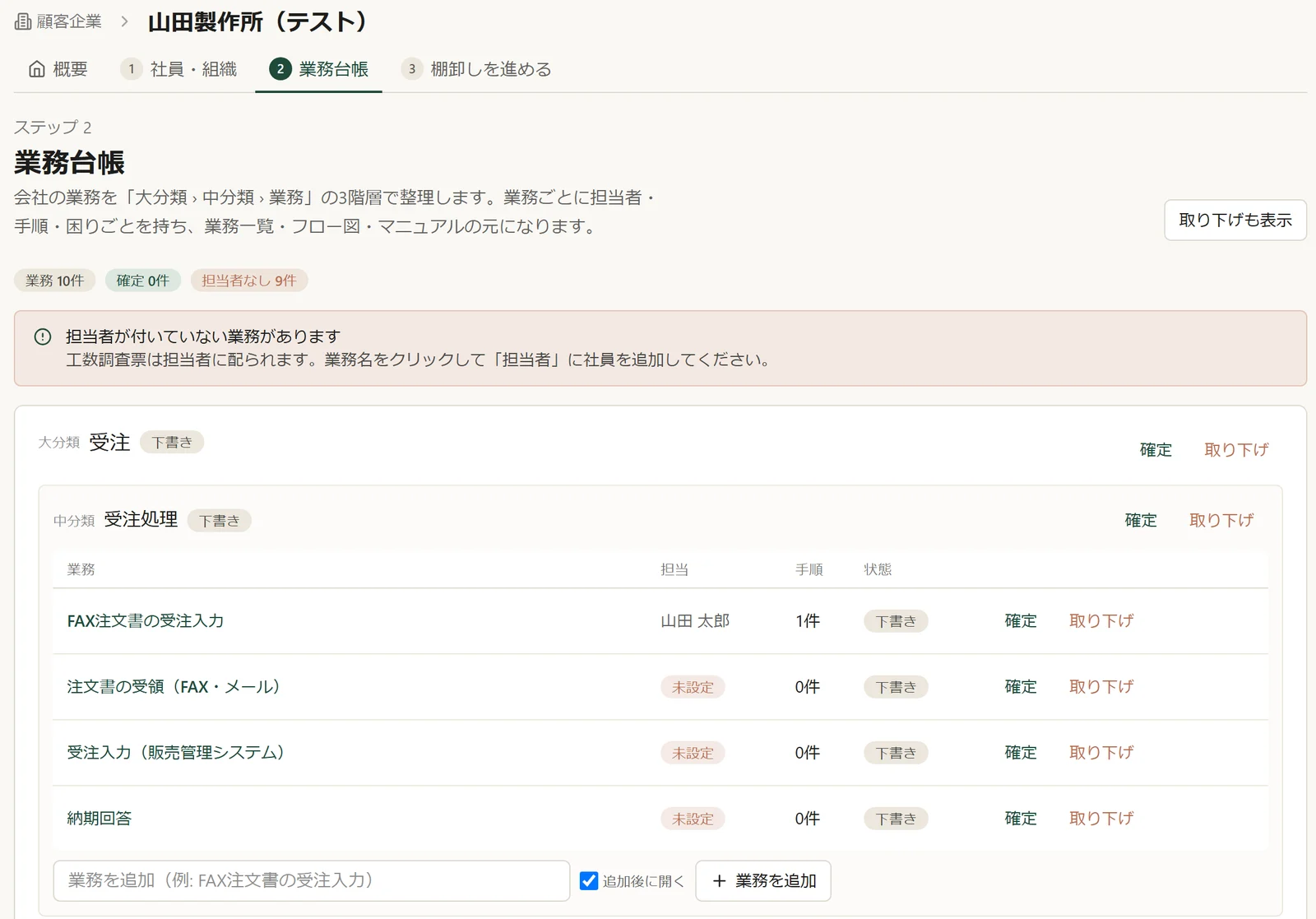
Screens show fictional test data. 01 / Work ledger
One ledger for all the work your company does
Organize tasks in three levels (category, sub-category, task), starting from templates such as order intake, purchasing, manufacturing and accounting. For each task, record who owns it, the steps involved and the pain points.
- Three levels
- Start from templates
- Owner, steps, pain points
Screens show fictional test data. 02 / Time survey
Ask staff where their time goes
Give the people in scope an invitation link or QR code, and they fill in how often they do each task and how long it takes. No email registration is needed on the staff side.
- Invitation link or QR code
- No staff email sign-up
- Frequency and time per task
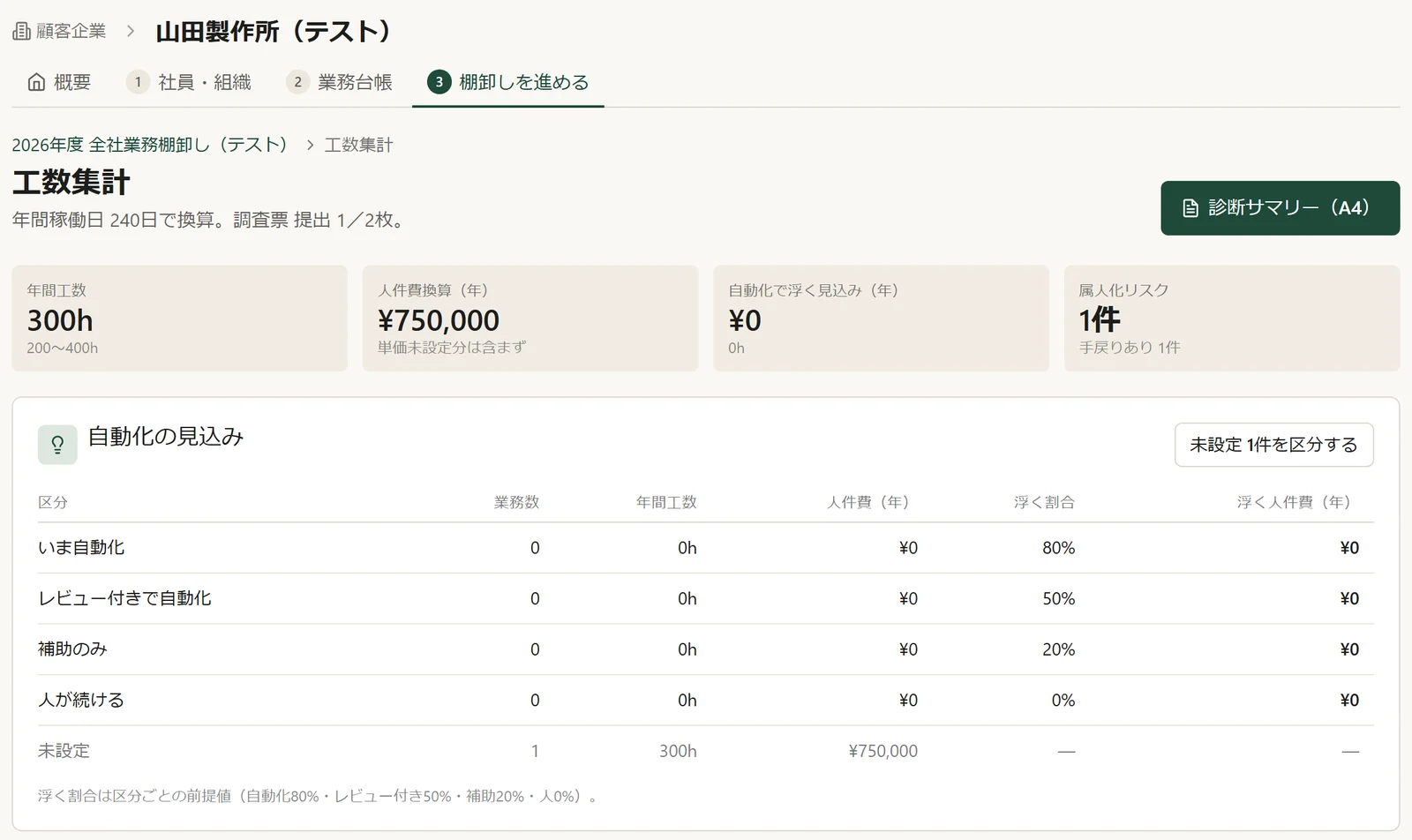
Screens show fictional test data. 03 / Analysis
Annual hours and labor cost, task by task
Responses roll up into annual hours and labor-cost conversion per task. En SCAN flags tasks with key-person dependency or rework, classifies automation potential, and produces a one-page A4 diagnostic summary.
- Annual hours
- Labor-cost conversion
- Key-person dependency & rework
- Automation potential
- A4 summary
Wondering whether it fits the way your company works? Let's talk.
Apply for early accessTrustPrivacy by design
Built so staff can answer honestly.
We believe a process inventory that feels like a headcount exercise will not get honest answers. So En SCAN separates what executives see from what they don't.
What executives see
- The confirmed work ledger
- Analysis resultsAnnual hours, labor-cost conversion and other totals
- Pain pointsOnly anonymously, and only once three or more people have answered
What executives don't see
- Raw conversation records
- The original wording of pain points
- Hours per personHidden from executives by default
RoadmapIn development
Next: AI that listens, then writes it down.
Working today
- Three-level work ledger with templates
- Staff invitations by link or QR code
- Time surveys
- Annual hours and labor-cost analysis
- One-page A4 diagnostic summary
In development
AI interviews
AI talks with each employee by voice or chat to list the tasks they handle and capture how they do them.
In development
Flow diagrams and manuals
Generate business flow diagrams and work manuals from the ledger.
Features in development may change.
Use casesWhere it fits
Where En SCAN fits.
Before AI or process improvement
Get a clear view of how work is done today, and use it to decide where to start.
Succession and post-merger integration
Put the work into a ledger so it can be handed over.
Reducing key-person dependency
Find the tasks that depend on one person, and decide which to document first.
With EnbitoBeyond the inventory
We stay with you after the inventory.
En SCAN is designed to be used within Enbito's consulting support. Starting from the inventory, we help you assess where AI fits and then put the changes into practice.
Product
En SCAN
Take stock of the work and measure hours and labor cost
Service
AX Discovery
AI readiness assessment and workflow audit
View serviceService
AX Transformation
AI implementation and automation
View service
FAQ
En SCAN: FAQ
What is En SCAN?
En SCAN (縁SCAN) is a business process inventory tool being developed by Enbito Inc. for small and mid-sized companies in Japan. It brings together a three-level work ledger, staff time surveys, and annual hours and labor-cost analysis with a one-page A4 summary, so the way a company works becomes visible, measurable and easy to hand over.
Can we use it now?
En SCAN is in development. The work ledger, time surveys, and hours analysis with the diagnostic summary are working, and we are looking for companies to adopt it early on a trial basis. AI interviews and the generation of flow diagrams and manuals are still in development.
What size of company is it for?
It is designed with SMEs of roughly 20–50 employees in mind. Contact us to talk through your situation.
Do staff need to register an email address?
No. Staff receive an invitation link or QR code and fill in a time survey for the tasks they handle.
Will executives see everything staff say?
No. Pain points are shown to executives only anonymously, and only once three or more people have answered. Executives see the confirmed ledger and the analysis, not raw conversation records or the original wording of pain points. Hours per person are hidden from executives by default.
How much does it cost?
Pricing is not published. We explain it together with the early-access terms, so please contact us.
Can Enbito help after the inventory?
Yes. En SCAN is designed to be used within Enbito's consulting support: AX Discovery (AI readiness assessment and workflow audit) and AX Transformation (AI implementation and automation).

Early access
Help us shape En SCAN.
En SCAN is in development, and we are looking for companies to trial it early. It is designed for SMEs with roughly 20–50 employees. Contact us for pricing and next steps.